
AI clinical notes, done before your next session
For therapists, psychiatrists and clinicians
Record the session, upload a recording or paste a few lines. Healquill turns it into a SOAP, DAP, BIRP or progress note in the format you use. You read it, change what you want, and export it to PDF or Word.
- 7-day free trial
- No credit card needed
- Cancel anytime
- Three ways to start
- Record live, upload audio or paste your own notes.
- Your format, your words
- SOAP, DAP, BIRP, progress or a template you build.
Draft
A structured note with every section filled in, ready for you to read.
Export
PDF or Word with your signature, or copy it into your EHR.
You stay in charge
Nothing is final until you sign it
How it works
From session to signed note in three steps
No new way of working to learn. Talk to your patient the way you always do, and let Healquill handle the write-up.
- Step 1
Capture the session
Press record in your browser, upload a recording you already have, or type a short summary. Choose the patient and the note format before you start.
- Step 2
Review the draft
A minute or two later the note is ready, split into the sections of your format. Read it, fix anything that's off, and drop in your dot phrases.
- Step 3
Export and move on
Download it as PDF or Word with your signature, or copy the text into your EHR. It also stays saved under the patient for next time.
4 formats
SOAP, DAP, BIRP and progress
Your templates
Built around your own headings
PDF and Word
Export with your signature
7 days free
Up to 10 notes, no card
Features
What you get from your first note
The parts of documentation that eat your evenings, handled: capturing the session, structuring the note, and getting it out the door.
Record, upload or paste
Record the session in your browser, upload audio you already have, or paste your own shorthand. Any of the three gets you a full draft note.
SOAP, DAP, BIRP and progress notes
Pick the format for each session. The draft follows its sections, so you're editing a finished note instead of rearranging a transcript.
Templates and dot phrases
Build templates around the headings you already use, and save the sentences you type every day as shortcuts like ./mse.
PDF and Word export
Download a clean PDF or Word file with your signature at the bottom, or copy the text straight into your EHR.
Inside Healquill
Your notes, templates and schedule
in one place
No more jumping between a recorder, a word processor and a calendar between patients.
Screens from a demo practice. Every patient shown is fictional.
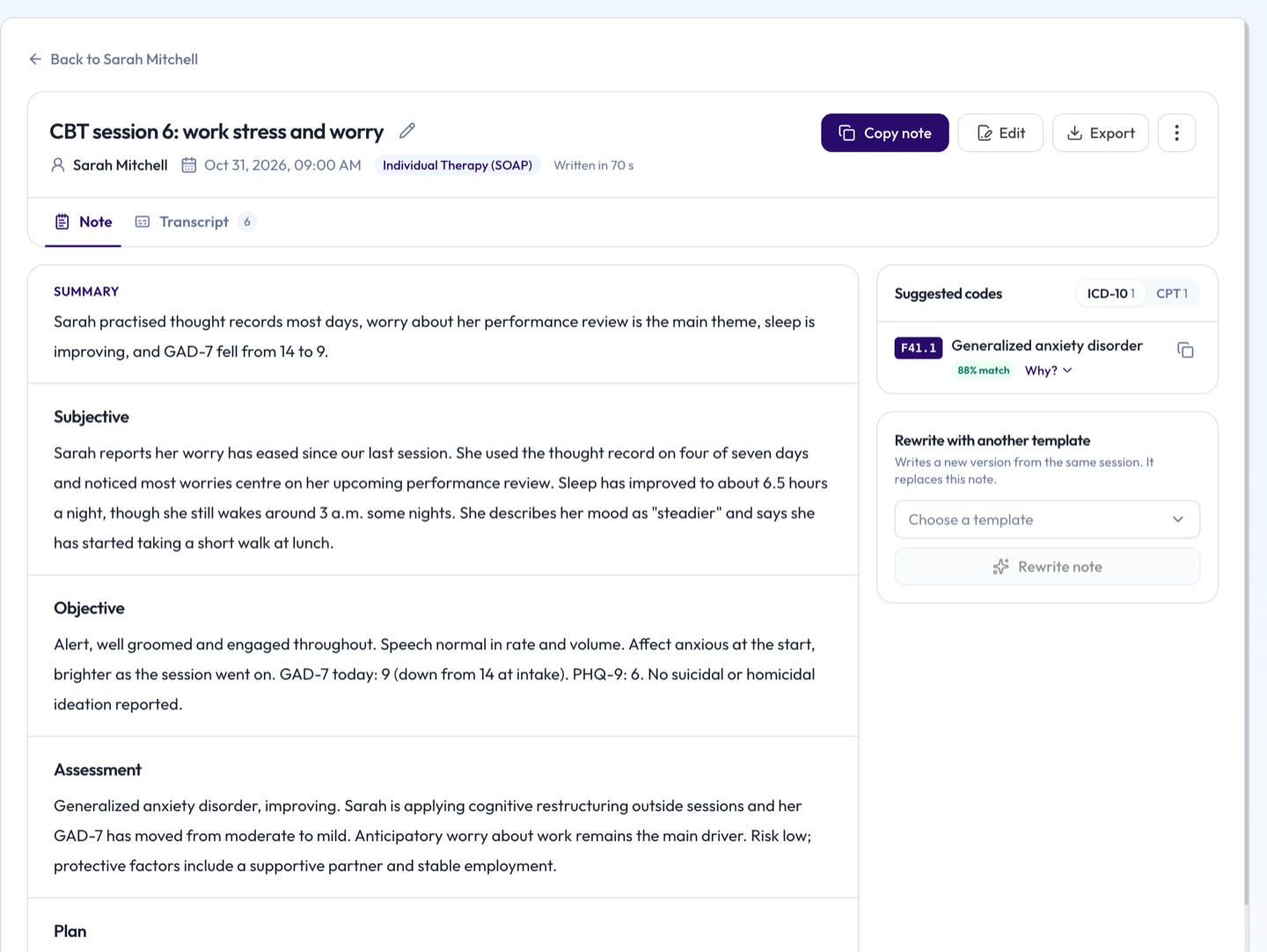
AI-written notes
Each session becomes a note in your template, with suggested ICD-10 and CPT codes for you to confirm. Edit any section, then copy it or export it to PDF or Word with your signature.
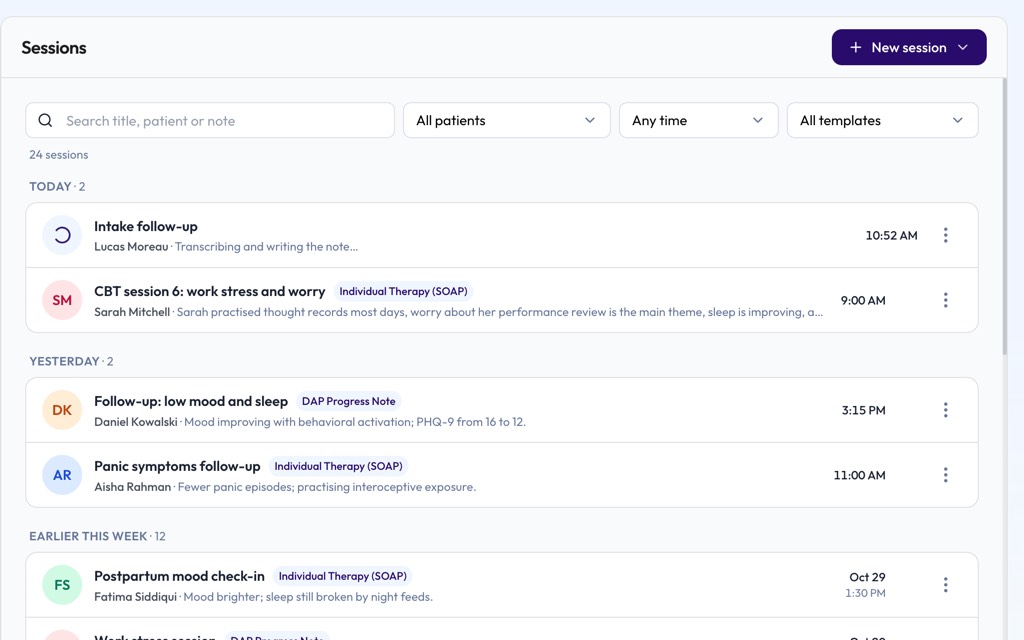
Every session in one list
A note still being written shows as in progress, so you can start the next session. Search by patient, date or template.
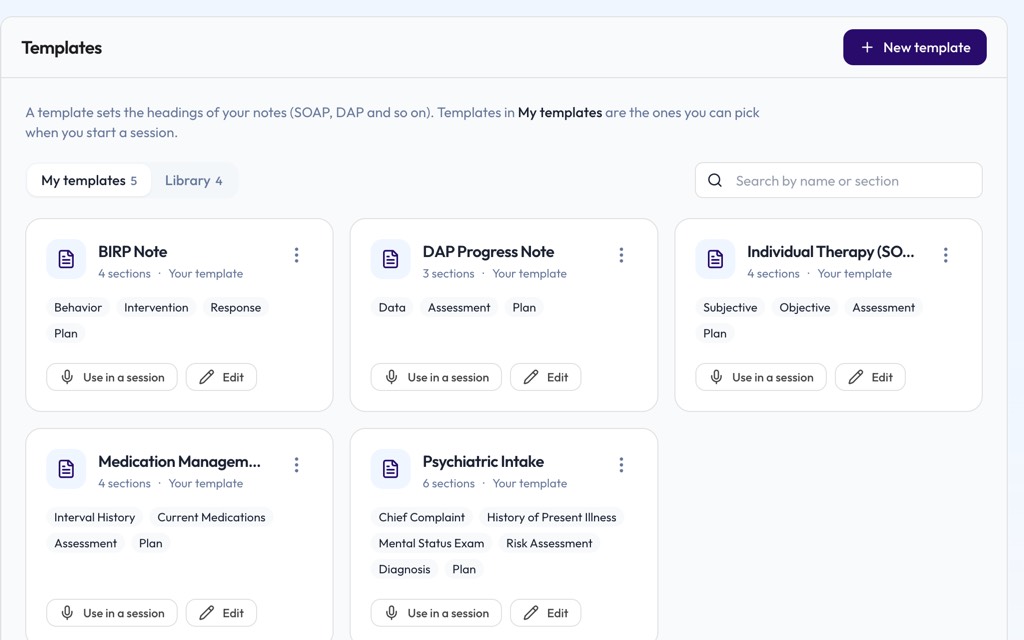
Your templates
SOAP, DAP, BIRP or your own headings. Set them up once and pick one for each session.
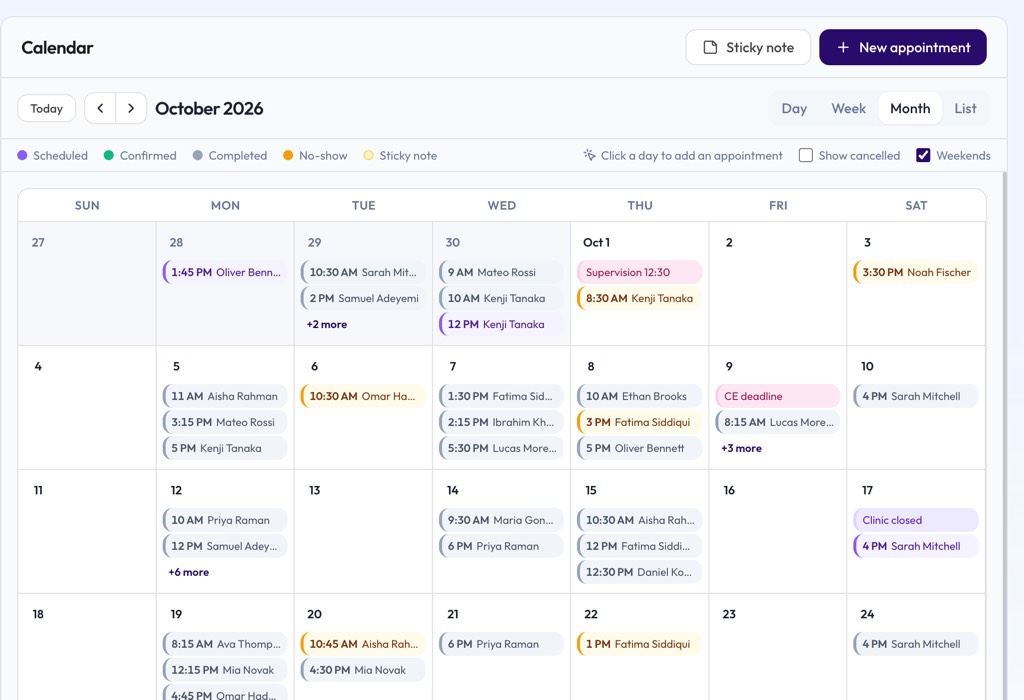
Calendar and appointments
Plan the week, see who's next, and keep sticky notes for the day.
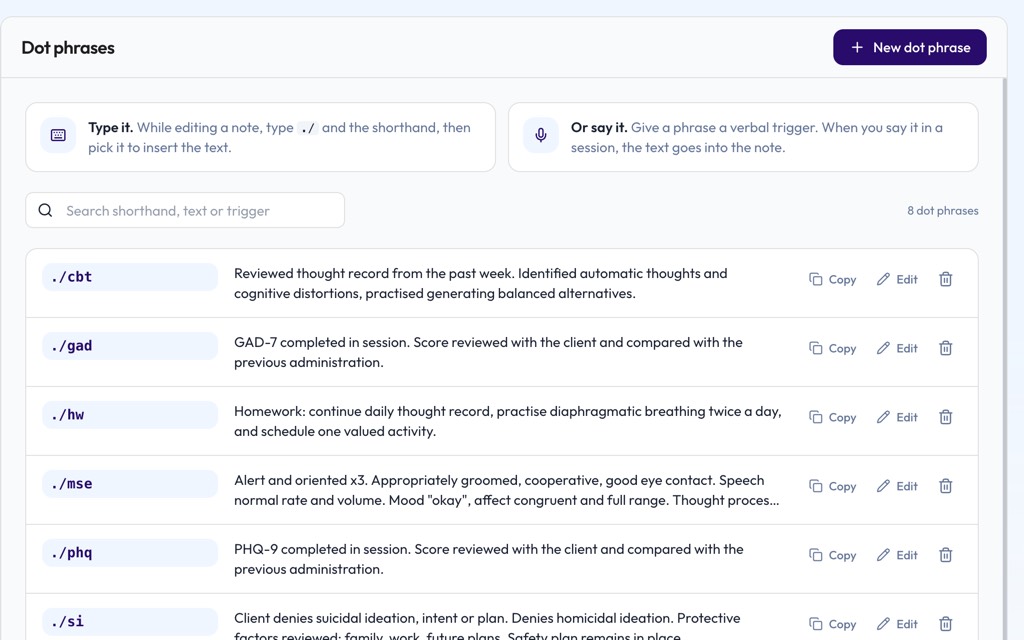
Dot phrases
Type ./mse while editing and your saved mental status exam drops in.
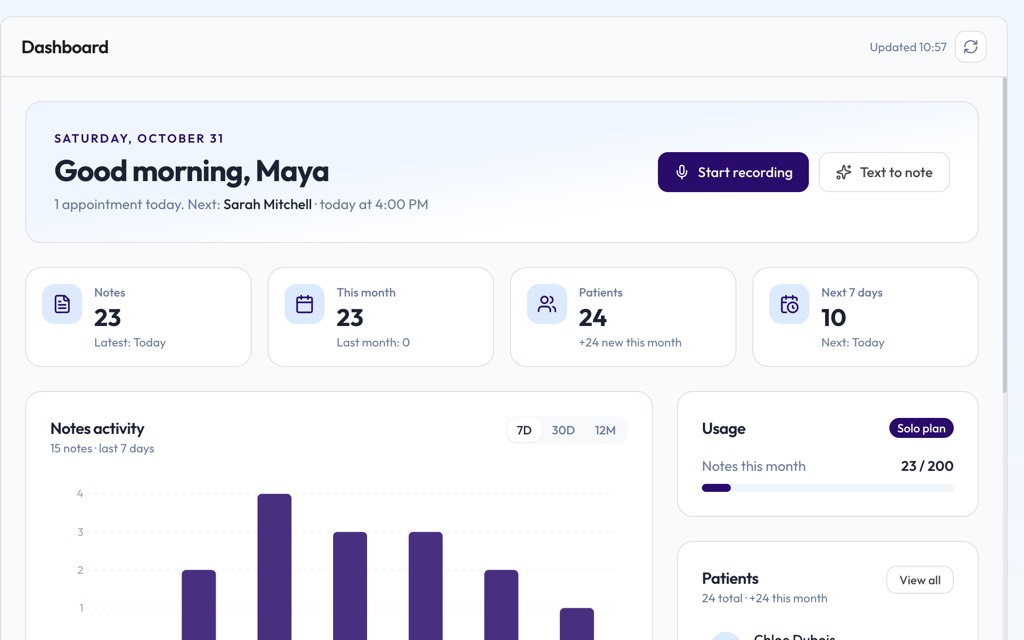
Your day at a glance
Your next appointment, recent notes and how many notes you've written this month.
Specialties
Notes that sound like your specialty
A therapy progress note and a post-op note don't read the same. Pick a built-in format or a template with your own headings, and the draft follows it.
Don't see yours? If you can describe how your notes are laid out, Healquill can follow it.
Start your free trialMade for the ten minutes between patients
Most clinicians don't need another system. They need the note written so they can stay present with the person in front of them. That's the whole idea.
Start a note from a live recording, an audio file or a few typed lines
Patient details, notes and transcripts are encrypted at rest with AES-256-GCM
SOAP, DAP, BIRP and progress formats, plus templates you build yourself
Your calendar, appointments and each patient's history in one place
Your signature added to every PDF and Word export

Workflow
Capture the session, check the note and export it without leaving the page.
Focus
Look at your patient, not your keyboard. The write-up can wait for Healquill.
Privacy and security
Patient data,
handled with care
Clinical notes hold some of the most private things people ever say out loud. Here is exactly how Healquill protects them.
Encrypted at rest
Patient details, notes, transcripts and uploaded files are encrypted with AES-256-GCM before they're stored. Every connection uses HTTPS.
Not used to train AI
We don't train AI models on your notes, and the AI provider we use doesn't train on data sent through its API.
Access by role
In a practice, clinicians see their own patients while owners and admins see the whole team. Two-step sign-in is there for every account.
Every access logged
Each time patient information is viewed or changed, Healquill records who did it, what they touched and when.
What's in place today
Specifics, not badges.
We'd rather tell you precisely what we do than put a logo on the page. Everything on this list is switched on for every account.
- AES-256-GCM encryption at rest, HTTPS in transit
- Two-step sign-in with an authenticator app
- Automatic sign-out after a period of inactivity
- Role-based access for practices and teams
- An audit log of every view or change to patient data
- Delete a patient and everything recorded for them in one step
Pricing
Simple pricing, no surprises
Try everything free for 7 days. After that, pick the plan that fits how many people write notes. Prices are in US dollars.
Try it
Free trial
No credit card needed
- 7 days, up to 10 notes
- Every note format and template
- Dot phrases
- PDF and Word export
- 1 clinician
For one clinician
Solo
or $28/month billed yearly
- Unlimited notes (fair use, about 200 a month)
- Your own templates and dot phrases
- Calendar and appointments
- PDF and Word export with your signature
- 1 clinician
For teams
Practice
or $68/month billed yearly
- Everything in Solo
- 5 clinician seats included
- Extra seats for $25 a month each
- Shared workspace with owner, admin and member roles
- Priority support
FAQ
Questions clinicians ask us
Short, straight answers about how Healquill works, what it costs and how it handles patient data.
What is Healquill?
Healquill is an AI note writer for clinicians. You record a session, upload a recording or paste your notes, and it drafts a structured clinical note in SOAP, DAP, BIRP, progress or your own template. You review it, edit anything you like, and export it.
How long does it take to get a note?
Usually a minute or two after you finish, depending on how long the recording is. Pasted text is quicker. You can start the next session while the note is being written.
Which note formats can it write?
SOAP (Subjective, Objective, Assessment, Plan), DAP (Data, Assessment, Plan), BIRP (Behavior, Intervention, Response, Plan), GIRP and progress notes are built in, along with H&P, consult notes, intakes, treatment plans, group and family therapy, PT/OT/SLP notes, operative reports, discharge summaries and letters such as referrals. You can also build your own template with your own headings, and Healquill will follow it.
Does it replace my clinical judgment?
No. Healquill writes a draft from what was said or typed. You read it, correct anything that's off, and you're the one who signs it.
Does it suggest ICD-10 and CPT codes?
Yes, when the session supports them. Each suggested ICD-10-CM or CPT code comes with the part of the conversation it's based on, and nothing is final until you confirm it.
Who is Healquill for?
Therapists, counselors, psychologists, psychiatrists and social workers use it for therapy and progress notes. It also works for primary care, dietitians and other specialties, since you can shape the note around your own headings.
How is patient data protected?
Patient details, notes, transcripts and uploaded files are encrypted at rest with AES-256-GCM, and every connection uses HTTPS. Accounts can turn on two-step sign-in, idle sessions sign out automatically, and every view or change of patient information is logged.
Is my data used to train AI?
No. We don't train AI models on your notes, and the AI provider we use doesn't train on data sent through its API.
Does it work with my EHR?
Yes, by export: download the note as PDF or Word, or copy the text into any EHR. Direct EHR connections are in development.
Is there a free trial?
Yes. You get 7 days and up to 10 notes with every feature, and you don't need a credit card to start.
Can my whole practice use it?
Yes. The Practice plan includes 5 clinician seats and a shared workspace with owner, admin and member roles. Extra seats are $25 a month each.
Can I cancel anytime?
Yes. Cancel from the Billing page whenever you like. There's no fee, and you keep access until the end of the period you've already paid for.
Try it this week
Less time charting.
More time with patients.
Write your next few notes with Healquill and see whether it gives you your evenings back. If it doesn't, you've lost nothing.
7-day free trial, no credit card required.